05.hardhat
什么是hardhast
理解为一个脚手架
是一个js库
quick start
安装
npm install --save-dev hardhat
初始化项目
npx hardhat init
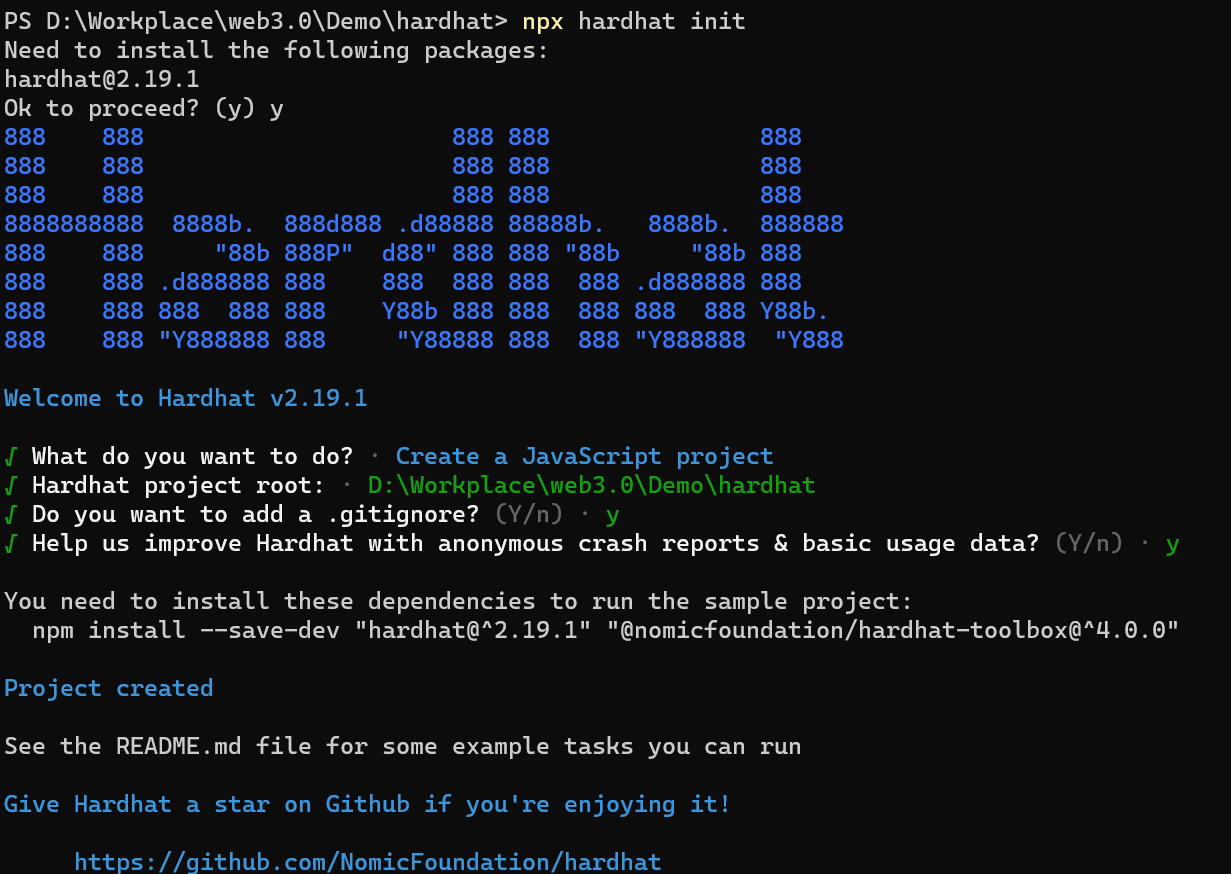
项目初始化成功
查看目录结构
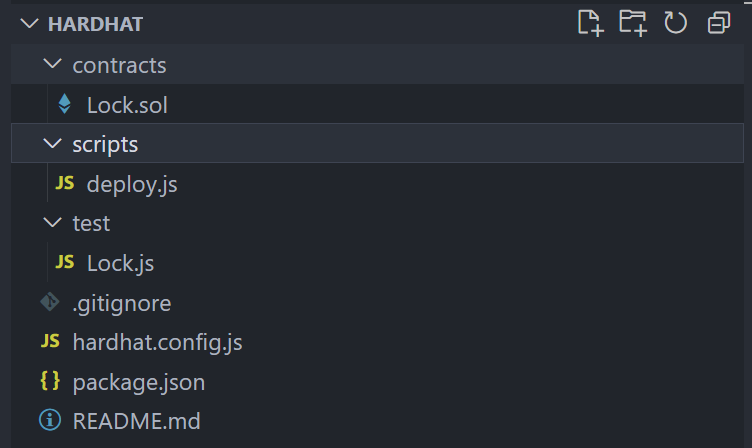
测试代码一般是合约代码的3-4倍
npx hardhat

Hardhat version 2.19.4

Usage: hardhat [GLOBAL OPTIONS] [SCOPE] <TASK> [TASK OPTIONS]

GLOBAL OPTIONS:

  --config              A Hardhat config file.
  --emoji               Use emoji in messages.
  --flamegraph          Generate a flamegraph of your Hardhat tasks
  --help                Shows this message, or a task's help if its name is provided
  --max-memory          The maximum amount of memory that Hardhat can use.
  --network             The network to connect to.
  --show-stack-traces   Show stack traces (always enabled on CI servers).
  --tsconfig            A TypeScript config file.
  --typecheck           Enable TypeScript type-checking of your scripts/tests
  --verbose             Enables Hardhat verbose logging
  --version             Shows hardhat's version.


AVAILABLE TASKS:

  check                 Check whatever you need
  clean                 Clears the cache and deletes all artifacts
  compile               Compiles the entire project, building all artifacts
  console               Opens a hardhat console
  coverage              Generates a code coverage report for tests
  flatten               Flattens and prints contracts and their dependencies. If no file is passed, all the contracts in the project will be flattened.
  gas-reporter:merge
  help                  Prints this message
  node                  Starts a JSON-RPC server on top of Hardhat Network
  run                   Runs a user-defined script after compiling the project
  test                  Runs mocha tests
  typechain             Generate Typechain typings for compiled contracts
  verify                Verifies a contract on Etherscan or Sourcify


AVAILABLE TASK SCOPES:

  vars                  Manage your configuration variables

To get help for a specific task run: npx hardhat help [SCOPE] <TASK>
编译
npx hardhat compile

Downloading compiler 0.8.19
Compiled 1 Solidity file successfully (evm target: paris).
ABI等生成
作为智能合约工程师,与团队协作时,如何与其他人协作(前端)?通过abi文件,abi文件是对外交互的一个接口
测试
npx hardhat test

  Lock
    Deployment
      ✔ Should set the right unlockTime (1048ms)
      ✔ Should set the right owner
      ✔ Should receive and store the funds to lock
      ✔ Should fail if the unlockTime is not in the future
    Withdrawals
      Validations
        ✔ Should revert with the right error if called too soon
        ✔ Should revert with the right error if called from another account
        ✔ Shouldn't fail if the unlockTime has arrived and the owner calls it
      Events
        ✔ Should emit an event on withdrawals
      Transfers
        ✔ Should transfer the funds to the owner


  9 passing (1s)
一般检查错误的两个方法:debug调试和print
智能合约可以print吗?
不可以,但是harthat可以帮助你,测试的时候可以看到print的信息
import "hardhat/console.sol";
....
console.log("Unlock time is %o and block timestamp is %o", unlockTime,block.timestamp);
....
运行
npx hardhat run scripts/deploy.js

Lock with 0.001ETH and unlock timestamp 1704189066 deployed to 0x5FbDB2315678afecb367f032d93F642f64180aa3
部署成功,那部署到了哪里呢?----部署到了本地的虚拟机
那怎么看本地虚拟机的状态
npx hardhat node

Started HTTP and WebSocket JSON-RPC server at http://127.0.0.1:8545/

Accounts
========

WARNING: These accounts, and their private keys, are publicly known.
Any funds sent to them on Mainnet or any other live network WILL BE LOST.

Account #0: 0xf39Fd6e51aad88F6F4ce6aB8827279cffFb92266 (10000 ETH)
Private Key: 0xac0974bec39a17e36ba4a6b4d238ff944bacb478cbed5efcae784d7bf4f2ff80

Account #1: 0x70997970C51812dc3A010C7d01b50e0d17dc79C8 (10000 ETH)
Private Key: 0x59c6995e998f97a5a0044966f0945389dc9e86dae88c7a8412f4603b6b78690d

Account #2: 0x3C44CdDdB6a900fa2b585dd299e03d12FA4293BC (10000 ETH)
Private Key: 0x5de4111afa1a4b94908f83103eb1f1706367c2e68ca870fc3fb9a804cdab365a
.....
共20个
WARNING: These accounts, and their private keys, are publicly known.
Any funds sent to them on Mainnet or any other live network WILL BE LOST.
用管道看命令的信息
npx hardhat node | more
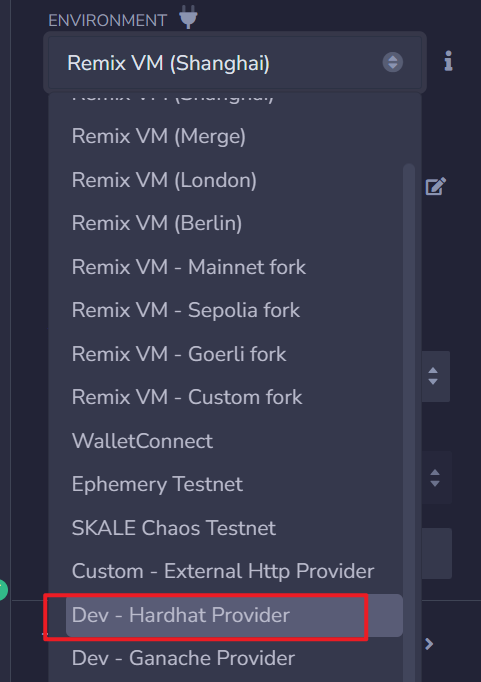
remix连接到本地虚拟机
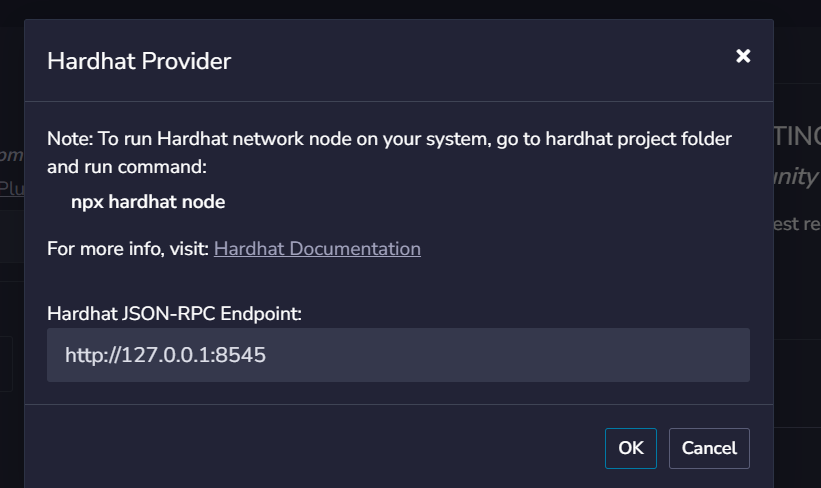
启动本地虚拟机 npx hardhat node
remix选择
hardhat如何把合约部署到测试网
修改hardhat.config.js
require("@nomicfoundation/hardhat-toolbox");
require('dotenv').config({path:'./.env'})

/** @type import('hardhat/config').HardhatUserConfig */
module.exports = {
  solidity: "0.8.19",
  networks:{
    localhost:{
      url:"http://127.0.0.1:8545"
    },
    testnet:{
      url:"https//exchaintestrpc.okex.org",
      chainId:65,
      gasPrice:3000000000,
      accounts:[
          process.env.PRIVATE_KET,//私钥地址
      ]
    }
  }
};
部署
npx hardhat run scripts/deploy.js --network testnet